
Team Captain Power BI Quick Start Guide
Power BI Quick Start Guide (PDF file)
Through Power BI reporting, you can track your team’s employee giving participation by individual and department.
- Go to Employee Giving - Power BI to view your department’s progress.
- Log in with your HonorHealth Microsoft account credentials to access the Employee Giving homepage (updated every Monday, Wednesday and Friday).
- Select your department and facility from the top-right pull-down menus.
- Select multiple departments and facilities if you are Team Captain for more than one area.
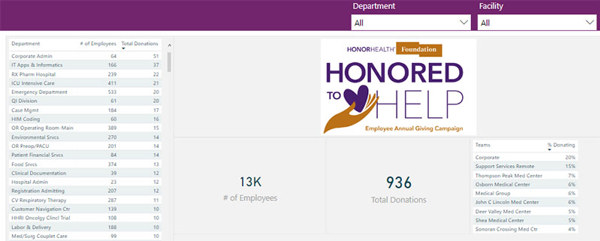
- Select multiple departments and facilities if you are Team Captain for more than one area.
- Data provided in the report includes:
- Who from your team is donating
- Employees who are donating are noted with a "Y" in the "Is Donating" column
- Employees who are non-donars have a "blank" in the "Is Donating" column
- Number of employees
- Track the number of employees in your department
- Total donatoins
- Track the number of employees in your department who are donating
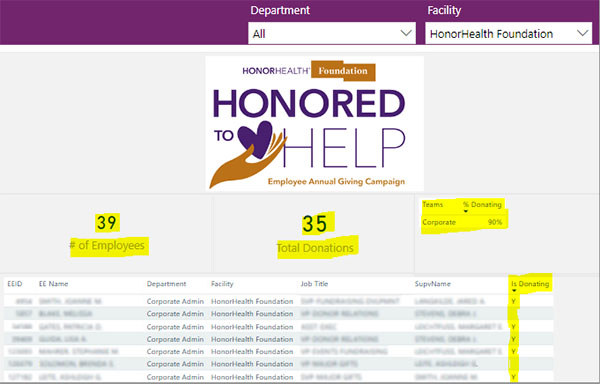
- Track the number of employees in your department who are donating
- Who from your team is donating
- Choose "Select all" from both the Department and Facility pull-down menus to view all data from all departments.
- If you need assistance accessing Power BI or have questions, contact Sarah Evans: sarevans@honorhealth.com